

Developer Guide
This document gives an overview about the structure of the PROFFASTpylot code. It should help all users who want to adapt PROFFASTpylot to their own needs.
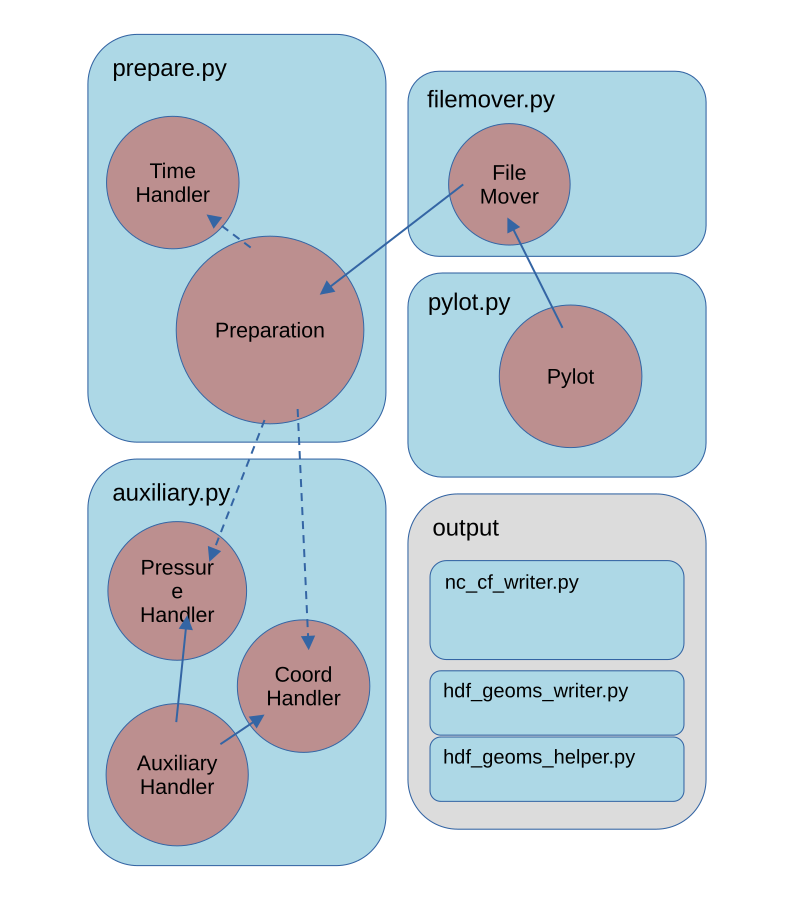
The general structure of the code is depicted schematically in the following image:
-
The
Pylotclass contains the most top-level functionality for steering PROFAST. The user creates an instance of thePylotclass. This class is inheriting functionality fromFileMoverandPreparationclasses. -
The
Filemoverclass contains the functionality to organize all output files in a file structure. -
The
Preparationclass contains most functionality determining the relevant parameters for the processing. It is the most extensive class. -
The functionality from the
PressureHandler,CoordHandlerandTimeHandlerclasses are called from the Preparation class.
These are the most important functions for steering PROFFAST. The most important functions and interactions are described in the following. Additional code for different output formats located in /output.
prepare.py
Generally the user provides an input file or dictionary with the corresponding parameters for the processing. From this many additional options are derived. This happens in the Preparation class. The following functionality is handled by the Preparation class.
Preparation
- Initialize logging
- Read the input parameters and derive parameters for further processing
- Read corresponding instrument parameters from list
- Search available interferograms/ spectra on disk
- Create a list of dates to be processed
- Generate the input parameters needed for the individual PROFFAST input files
- Handling of coordinates (can be either fixed or variable; for variable coordinates see
CoordHandler) - Interpolate mapfile to local noontime
TimeHandler
- Time zone of the processing and list of dates
- Return
local_time,utc_timeandmeas_timefor a given spectrum or interferogram - Determine local noon of a given day for given coordinates (here, always the local timezone of the location is used, never the daylight saving time)
- Cross-check time consistency
filemover.py
PROFFASTpylot disentangles the output, input and program files. Therefor files that are written to a location inside the PROFFAST folder by the FORTRAN PROFFAST routines are moved at the end of a run. This sorting of the files is handled by the Filemover class.
Filemover
- Create the output file structure
- Move or copy generated files from the prf folder to the result folder
pylot.py
Here the most top-level functions called by the user are present.
Pylot
- Execute the three PROFFAST routines (preprocess, pcxs and invers)
- Call generation of input files for PROFFAST by filling the corresponding parameters into the respective templates
- Combine results
auxiliary.py
PROFFAST needs accurate pressure data. Pressure values can be read from a file with variable formatting and data frequency. This is handled in auxiliary.py in the class PressureHandler. An internal dataframe is created from the file by prepare_pressure_df(). It can be accessed by Pylot.p_df.
For handling observations with a variable position of the instrument the coord handler interpolates coord data to the observation time steps.
The AuxiliariyHandler class contains all functionality that is shared between both classes.
AuxiliaryHandler
- Read data and construct dataframe
- Parse datetime column from one or multiple columns
- Interpolate data to specific time
PressureHandler
- Create pressure dataframe as a instance of PressureHandler
- Apply pressure Factors
- Filter Outliers
CoordHandler
- Create coordinate dataframe
- For High-Frequency-Data average over observation period, otherwise interpolate to observation time
Output
There are four types of output:
- Raw output:
The PROFFAST routines are writing several asccii formatted tables, which are placed into theraw_output_proffastfolder. - comb_invparms_<...>.csv
Combines all invparms files and renames the most important to identifyable names (seepylot.pylot.combine_results()) - HDF5 (GEOMS)
HDF5 binary files following the GEOMS conventions are produced byoutput/hdf_geoms_helper.pyandoutput/hdf_geoms_writer.py. These files contain the vertical columns, the column averaged molar fractions, and the column sensitivities, as well as the prior profiles for CO2, CO, CH4 and H2O. - netCDF4 (cf)
This files contains the same information as the HDF GEOMS files but is delivered in netCDF4 format and follows the cf conventions. It is generated byoutput/nc_cf_writer.py.