

Questions & Answers
Questions and answers about various topics related to data, instrument and more.
The list will be updated when new questions or problems occur.
OPUS not operating
Date of notification: March 25th, 2019.
Date of incident: March 18th, 2019 (1st event) and March 25, 2019 (2nd event)
Instrument's serial number: SN075
Instrument's location: University of Toronto, Canada
Setup description:
Instrument is set up in a Robodome located at the roof top of the physics department building and is controlled remotely. Last set up was March 1st. The instrument was not turned off since.
Problem:
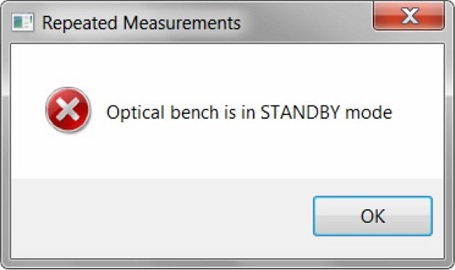
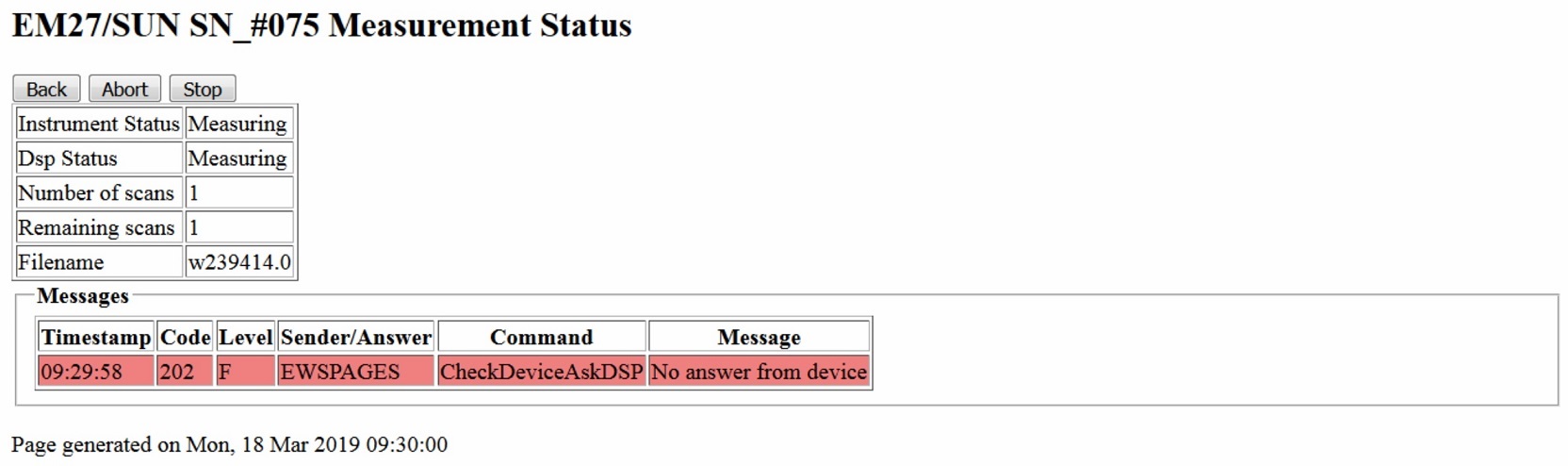
Opus stopped taking measurements and froze. The following OPUS error occured:
"Optical bench is in STANDBY mode". See Fig.1 and Fig.2.
Temporary Solution:
Restart the instrument (turn off and on the EM27/SUN).

EM27/SUN Problem with operation of CamTracker
Date of notification: from February 2nd, 2021, onwards
Date of incident: from February 2nd, 2012, onwards
Instrument's serial number: NA
Instrument's location: NA
Setup description: Notebook running Windows® 10 OS and EM27SUN using VRmagic Camera.
Problem:
Windows® 10 and the CamTracker (this collection of advises have been compiled by Jochen Groß, KIT)
Temporary Solutions:
- Windows® Updates
Did the problem appear immediately after a (possibly silent) Windows® update. Try rebooting (eventually several times)! - USB Driver(s)
Most of the problems we experienced had to do with missing, faulty or misbehaving buggy USB drivers (not the camera drivers!), especially when using "new" USB3 equipment. Try to get the driver that fits best to your USB chipset and Windows® version. You should get them from the support area of the computer's or motherboard's maker. Or even more up-to-date directly from the chip(set) manufacturer. To find out the model, have a look at Windows®' device manager. Even with yet unknown ports/chipsets (showing a yellow exclamation mark) go to "properties", "details", and finally to "hardware-IDs". Here you'll find the vendor-ID and device-ID, e.g. "[...]VEN_8086&DEV_9D2F[...]". Use this information to search the internet for the correct driver and/or firmware package. Beware, do not download anything from anywhere but the manufacturer's site. - USB Hardware
Also USB (especially USB3) cables are very prone to fail. Have you tried another one (e.g. a shorter one)? Long cables may suddenly stop working if you run them alongside other energized cables. - EM27 USB Socket
There is a "hardware bug" at the outer USB socket at the EM27. If this has not been fixed yet, the inner part may slide away backwards some millimeters. If you then use the provided on-screwable USB plug you will not get solid contact anymore. - CamTracker Software
There is one screw you can turn: the pixel clock. If you have too many disruptions in the transfer (that is when you get blue screens) a lower pixel clock will reduce the amount of data transferred in the same time and be therefore more stable. (If you have installed the VRmagic DevKit of the camera, you can test the camera and detect dropping frames with the "CamLab" program.) The pixel clock is changed in CamTracker's internal configuration file. Play with it. Keep in mind: Due to the principle of real time video stream transmission over USB you cannot guarantee the correct transfer of "_every_ frame". At least not in this USB mode. But normally some rare blue screens are no problem for the CamTracker. It will log a warning and go on with the next image it can get. Apart from that there was only one little fix for CamTracker regarding the graphical user interface if you use the "high dpi" settings of Windows® 10, i.e. if you use a scaling (for fonts, apps etc) other than 100%. So there were no changes in the software on the USB side. Any recent version should do. - The Camera's Driver
It has not been updated for a long time (and it won't in the future), and if everything worked well in the past, I am pretty sure you already have the freshest driver (v1.0.9.8) installed. The vrmusbcam2.dll should be v3.5.0.0
Caution: If you have played with the DevKit of VRM (you know what this is as you have installed it), you have to be sure that you use the 32-bit version! The type (32bit or 64bit) is not related to the operating system but the software that will use the driver (CamTracker.exe is a 32bit executable). - The Camera
Another idea: the camera is just broken? Did you try with another PC and/or OS to get a stable video stream? There is also a slight chance that you own a camera with an old firmware version. You can check the firmware version with the CamLab tool from the DevKit. It should read "22.10". In case it does not, you can get a firmware update tool from <https://www.vrmagic-imaging.com>. But only start an update with a surely fine working USB environment. Here we've come round in a circle.
Cleaning of EM27/SUN mirrors
Note: Careful handling during cleaning is important to avoid damage to the mirror coating!
Date of notification: from June 18th, 2024, onwards
Date of incident: NA
Instrument's serial number: NA
Instrument's location: NA
Problem:
Dirt on EM27/SUN mirrors
Solution:
It is important to avoid pressure during cleaning, agressive solvants and excessive cleaning methods, such as repeated circular wiping. In addition, the spectrometer has to be switched off and the elevation motor manually rotated into a position allowing convenient access.
For cleaning the mirrors without affecting other elements, a cosmetic pad soaked with ideally demineralised water and some dish washing agent can be used. A small amount of cleaner is beneficial to avoid excessife foaming. Alcohol, optical cleaner or optical tissues should be avoided.
The pad needs be moved gently across the mirror along straight lines, without applying more pressure than its own weight. Furthermore, this procedure should not be executed on the same pad area multiple times, as caught particles can provoke grinding. By washing out the same pad in the water-dish washing agent mixture, it could still be used for several swipes.
Accumulating water at the lower rim, as well as individual droplets on the mirror, can be taken off with a soft paper handkerchief. In case of some remaining water on the surface, it should not be wiped away. Any remaining evaporated droplets or traces of water and dish washing agent can be ignored, as they will not affect the performance of the instrument. To reduce the risk of left residue, a few final wipes with demineralized water can be done and the remaining liquid absorbed with the edge of a handkerchief.
Sometimes cleaning just the first mirror is sufficient. To avoid dismounting the mirror, some paper wipes can be put underneath the mirror during wiping. The paper wipes are able to collect the rinsing water.
If it is required to clean the entrance window, the procedure is basically the same. As its surface is less delicate, the remaining water at the end of the procedure can be wiped of with a handkerchief that was shaken out, to avoid spreading of tiny fluffs. Inadvertently touching of the mirror below the tracker can be avoided by dismounting the tracker before the window cleaning procedure or leaving the window surface unchanged.
Operation of OPUS and CamTracker with another operating system than Windows® 10
Date of notification: December 1st, 2025
Date of incident: NA
Instruments serial number: NA
Instruments location: NA
Problem:
Operation of OPUS and camtracker running under Windows® 11
Temporary Solution:
The EM27/SUN setup has been migrated to Windows® 11. The CamTracker and newer OPUS codes are operating under Windows® 11, but the operation is not supported for Linux anymore. For the operation with older OPUS versions some folder permissions may need to be adjusted for measuring under non-administrator accounts.
In case of no actual access to Windows® 11 compatible hardware (yet), there are still old Windows® 10-LTSC versions (2019 or 2024 version) being supported until 2029. This option must be clarified with the relevant IT department.
EM27/sun operation under temperatures beyond the operational range
Date of notification: November 26th, 2025
Date of incident: NA
Instruments serial number: NA
Instruments location: NA
Problem:
Operation of spectrometer under high temperatures
Temporary Solution:
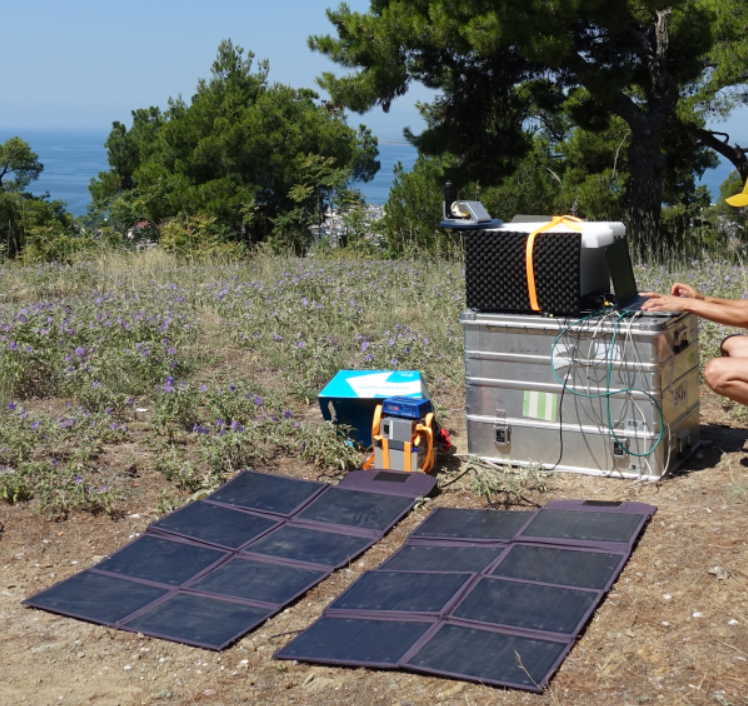
If the EM27/SUN is operated at higher temperatures outside the temperature range of 0 to 40 degrees Celsius, some precautions are helpful.
Direct solar radiation should be avoided by shadowing. As some materials show some absorption bands, the tracker can be left out of the shadow-providing device, for example through a hole allowing the solar radiation to enter. Example shelter constructions can be seen in Fig. 3 and Fig 4.

In combination with passive cooling through air circulation between the spectrometer and the shade-providing device, it can be operated at higher temperatures to a certain extent. But the hot conditions could shorten the service life of the electronic components in the long term.
A shelter with active cooling might be more helpful. This could be, for example, a cooling circuit using water, including a cooling unit sitting next to the setup, with the cooling loop being in contact with the aluminium baseplate of the spectrometer.
Overall these options could enable operation under hot conditions, but they still offer no guarantee.
More information about shelter constructions and commercially available shelter solutions can be found under Shelter solutions.

Necessity of a MIRA data logger
Date of notification: December, 15th, 2025
Date of incident: N.A.
Instrument's serial number: N.A.
Instrument's location: N.A.
Problem:
MIRA datalogger necessary for independent pressure measurements, e.g. for site change without available meteorological data
Possible Solutions:
- For temporary use a cheap pT-logger is effectual for campaign measurements, as long as precise calibration is done before and afterwards
- For permanent use a higher-quality sensor is recommended for avoiding shifts and calibration uncertainties. It could be helpful to use a pair for having redundance, recognizing drifts and the possibility to remove one unit for recalibration. Recalibration should be done annual or at least biannual.
PROFFAST errors and operation problems
Date of notification: December, 3rd - 12th, 2025
Date of incident: N.A.
Instrument's serial number: N.A.
Instrument's location: N.A.
Problem:
invparms.dat files and spectra were not produced, log-files seemed to be rejected by PROFFAST and error flag 100 000 is given
Error message of PROFFAST:
----
Traceback (most recent call last):
File "/home/hpark17/proffastpylot/retrieval/run.py", line 26, in <module>
MyPylot.run(n_processes=2)
File "/home/hpark17/proffastpylot/prfpylot/pylot.py", line 66, in run
self.combine_results()
File "/home/hpark17/proffastpylot/prfpylot/pylot.py", line 372, in combine_results
df = self._get_merged_df()
File "/home/hpark17/proffastpylot/prfpylot/pylot.py", line 488, in _get_merged_df
raise RuntimeError(
RuntimeError: Retrieval did not produce any *invparms*.dat files
----
- error flag: level of nonlinearity is too high, creating significant out-of-band artefacts
- out-of-band artefacts: ratio of integrated artefacts divided by integrated signal amplitude of spectrum
- temporary solution: lower the thresholds for the allowed level of the out-of-band artefacts from 0.01 to 0.005
- ifg amplitudes: selection of pregain and gain
- by reducing the ifg amplitudes the effect can be lowered to a value that exceeds the threshold of the new improved test
- concerning measurement taken on days threshold is not met:
- if only a few days affected and lower ifg count numbers cures problem, the few measurements are easiest to be forgotten
- if significant part of historic time series are unusuable due to the problem:
- previous set of processing results could be regarded as the final one
- using the new option of nonlinearity correction available in preprocess to cure the problem; but requires considerable characterisation work on each affected spectrometer for setting up correction first and being part of operational processing afterwards